lockjingle
LockJingle
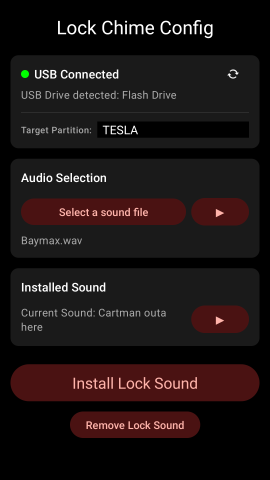
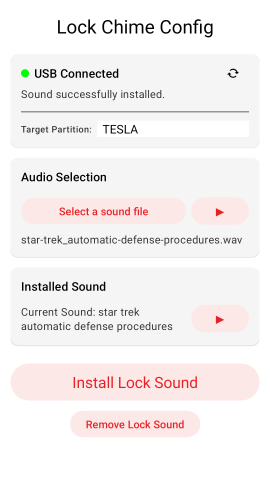
This Android app allows the user to configure the Tesla Lock Chime using their phone. It supports autodetection of USB drives, browsing/previewing/installing the chosen file to external storage.
It also supports multiple partitions on the target drive. Installing a LockChime.wav file to each of the partitions gives a pseudo-random lock sound.
WARNINGS
⚠ this app requests ACCESS_ALL_FILES permissions to allow it to automatically detect external storage, and to provide a seamless user experience.
⚠ the autodetection takes around 5 seconds after the USB is inserted. To avoid the delay insert the USB before launching the app
Video
Click the screenshot for a video of the app running
Features
- Auto-detects the presence of external USB (or manually scan for attached USB drive)
- Files can be read from internal, external (USB), or Google Drive
- Supports reading wav, ogg, and mp3 file
- Allows the uer to preview the selected audio
- Writes the file to the USB in the required location with the required name
- Updates the metadata in the written file to allow the installed file to be identified
- Allows the user to play the currently installed file
- Supports multiple partitions on the USB (which enables pseudo-random lock sounds)
- Supports light and dark modes (will follow the current mode)

Usage
- Connect a USB drive to your phone. Depending on your drive you may need an adaptor to be able to connect it to your phone
- Launch the app
- Browse for an audio file (wav, mp3 or ogg)
- Preview the selected sound if desired
- Preview the currently installed sound if desired
- Click “Install Lock Sound”. If you get an error about no USB found, ensure it is inserted correctly and click “Re-scan for USB drive” and then try installing again. you should see the message “Sound successfully installed”
- Plug the USB drive into the USB port in your Tesla’s glove box
- Launch Boombox on your Tesla and select “USB” for the lock sound
Privacy
This app doesn’t collect data of any sort, however Google Play requires a privacy policy. This is available here: Privacy Policy
Problems?
Shoot me an email if you have any issues. I have limited devices to test on, so I’m sure there will be some quirks out there.
About Me
I’m a retired software engineer who still writes code for fun… mostly because the alternative is talking to people.
I spent years turning caffeine into features, debugging at 2 a.m., and pretending “it works on my machine” was a valid strategy. Now I mostly make things that amuse me (and hopefully you).
If my work has ever saved you from a stack overflow rabbit hole, made you snort-laugh, or simply delayed your own existential crisis by a few minutes — feel free to buy me a coffee.
I’ll use it to stay slightly more functional and slightly less grumpy.
Thanks for being here. You’re the real MVP. ☕